How do I use the Presentation Pointer? Follow
Introduction
The presentation pointer is useful for easily switching between slides while maintaining your focus on the group.
This article will detail the features of the presentation pointer and what they are used for.
Using the Presentation Pointer
Features
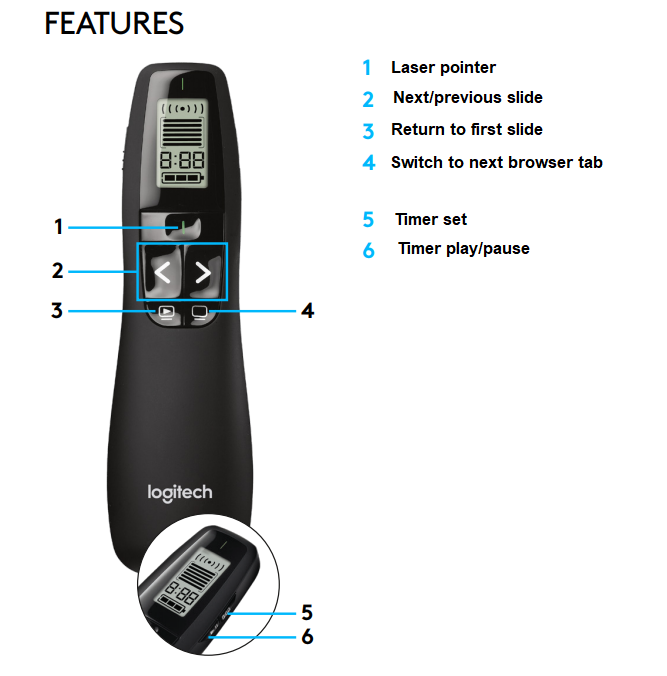
There are six different features for you to use when briefing the group.
1. Laser Pointer
2. Next/previous slide
3. Return to first slide
4. Switch to next browser tab
5. Timer set
6. Timer play/pause
Using the Presentation Pointer
Each feature acts as a time-saving mechanism, allowing you to complete your briefing quickly.
Each feature can be used for the following:
- Laser Pointer - This can be used to draw the group's attention to a certain area.
- Next/previous slide - This can be used to advance to the next slide or return to the previous slide.
- Return to first slide - This can be used to take you to the beginning slide.
- Switch to next browser tab - This can be used to change to the next game tab on the same browser.
- Timer set - This can be used to time your briefing and suit up process.
- Timer play/pause - This can be used to autoplay the slides.
Article Keywords/Phrases:

Logitech
R800
Presentation pointer
briefing pointer
Comments
0 comments
Article is closed for comments.