Facebook Broad Reach Campaign Overview Follow
Introduction
Facebook marketing is one of the most effective means of driving traffic & conversions to your Zero Latency website. Whilst every individual site may have differences in their digital marketing landscape, this How to guide will serve as a general way point on how sites should segment their clients digitally and create campaigns specifically to target those groups.
Step 1: Broad Reach Campaign Set Up and Campaign Objective
Step 2: Audience Building and Ad Set Name Best Practices
Step 2.1: Example of Detailed Targeting
Step 3: Placements and Spending Controls
Step 4: Ad Creation, Ad name best practice and Campaign Artwork
Step 5: Languages and Tracking
Overview
Broad Reach campaigns are campaigns generally aimed to the top of your site funnel. Often times these campaigns are simply to bring brand awareness without the intention to convert. The type of people who fall under this category would be.
- People who don’t know what is Zero Latency VR.
- People who may or may not understand what VR is, but have come across or interacted with it in limited amounts.
- Look alike audiences that may not know Zero Latency, but will have the potential to like what Zero Latency offers, such as paintball enthusiasts, video gamers, escape room junkies, zombie movie lovers, sci-fi lovers… etc
Messaging for the particular campaign should be educational in nature, so copy writing for the ads should aim to be succinct, to the point, and obvious, highlighting things that people can easily associate with.
Step 1: Broad Reach Campaign Set Up and Campaign Objective
In this section you will be selecting your campaign outcomes to match that of a broad reach campaign strategy.
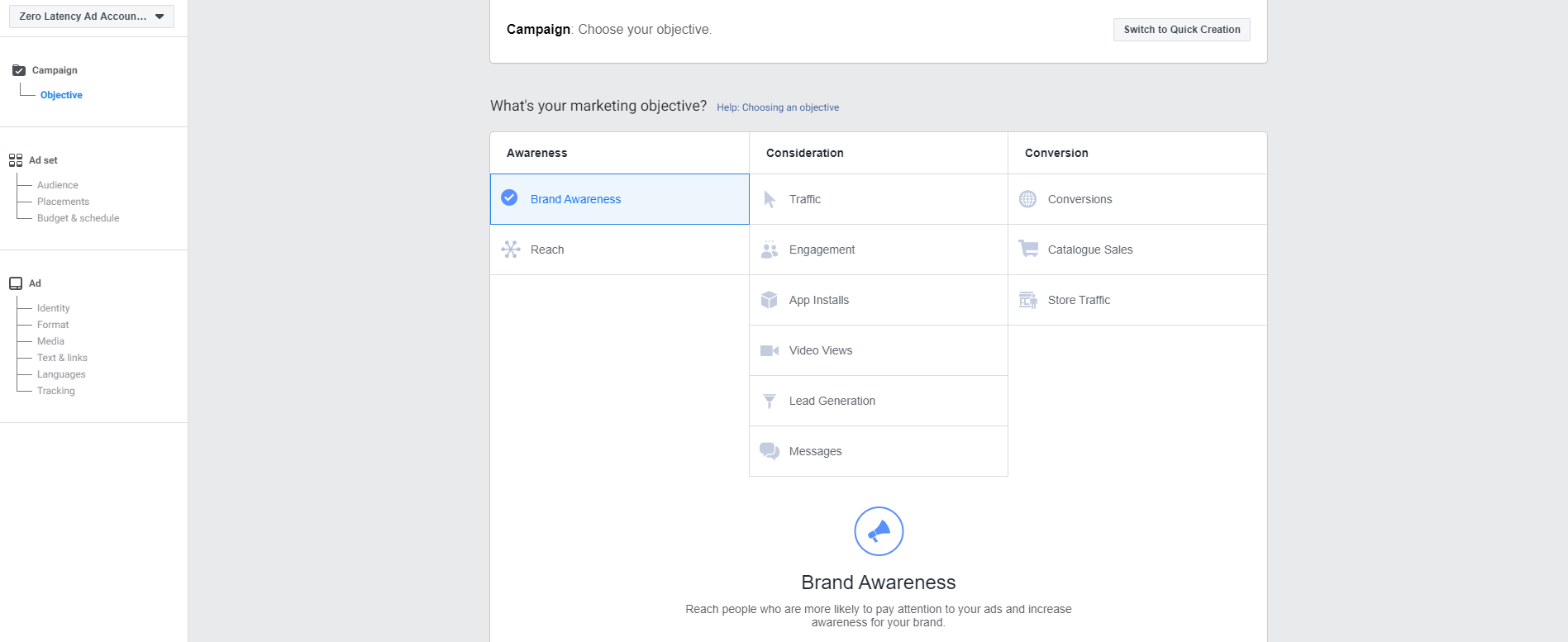
Brand awareness or Reach could be the objective of your ad.
Once you’ve chosen your desired outcome, other things you will have to consider next would be the budgeting, ad spend and scheduling of your campaign.
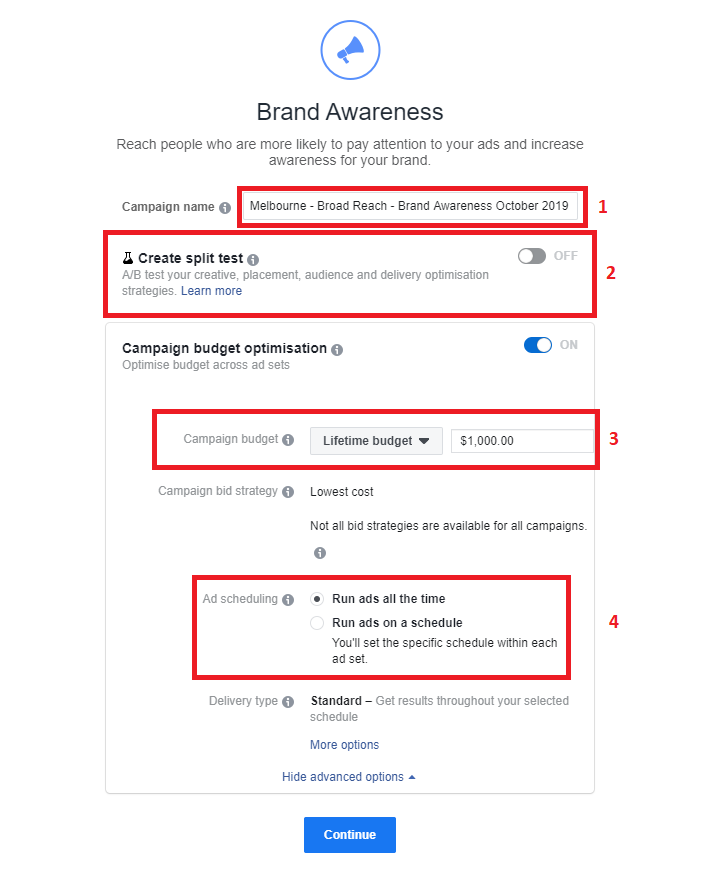
- Campaign Naming : Best practice naming should include your campaign type (broad / medium / re-target) to further understand the segmentation. We recommend running your campaigns for at least 30 days to be able to get an in depth data set. (example of naming : Broad - Brand Awareness - 60 days - October 2019)
- If you are unsure on which artwork or would like to test 2 different data sets to find out what works best with your market, an A/B split test is recommended. Whether it be testing which artwork gets more views (zombie poster) or a video of a girl screaming whilst playing your game, this would be the place to switch it on and fill in your ad.
- It is always recommended to have a lifetime budget set on your campaigns to ensure that overspending does not happen. As we recommend a minimum 30 day campaign period, your lifetime budget ensures that there will be consistent ads running throughout the month for that spend
- Ad scheduling - You can choose to run your ads all the time throughout the month. However if you feel that there are more conducive times to run your ads, you may select certain hot time slots where you believe that many more people will be looking at Facebook / other ads (case study example : Brisbane’s opening hours are between Wednesdays to Sundays, and has a high viewing traffic at 4-9pm on weekdays, so they have decided to set their ads to only show between Wednesdays to Sundays, during those times)
Step 2: Audience Building and Ad Set Name Best Practices
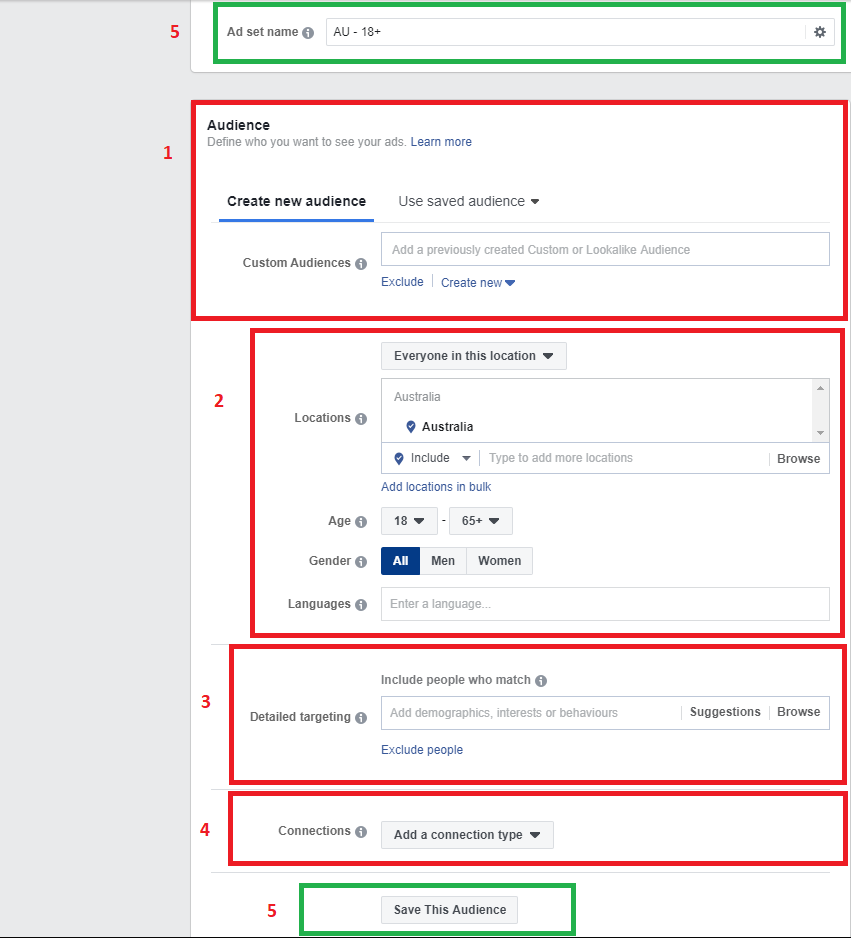
Once you’ve decided on your objective, budget & scheduling, you will now move onto the next section - the audience section.
- In this custom audience section, you will often find yourself recommended audiences from previous input or historical inputs. However if you are creating ads from a fresh account, this will be for you to input your audience which Facebook AI will extract from users in the digital customer journey channel. It is recommended that in this tab, for a broad reach audience, that you place lookalike audiences as a priority. As lookalike audiences would target the people most likely to engage with your ad, without having seen your Zero Latency Brand before. Going back to the targeted audience, this will include people who for example, likes a paintball page near your area. You may fill this audience with as many types of target lookalike audience. But a good suggestion to start would be audiences such as
- The location tab can be used and tailored to target a certain area within your surrounding map & location as well as the desired age range. It is important to remember that Zero Latency’s global stats show a 72% male audience, and a 28% female audience (2019 stats). With the highest players falling in the age range between 20 - 40 years of age (42% falling under that age). While that may not change how you market or segment this age range, it is an additional insight on how you might want to target your audiences and tailor an eventually offer to them. The language section is particularly important if you are demographic targeting 2 different types of offers in the same region. For example, in non English countries that have a high amount of expat tourism, it is worth having a dual targeting system with ads to 2 different language segment of the market.
- Detailed targeting is where you will fill in the blanks in a macro level on who are they types of people who would like to target. Would they like movies featuring zombies? Is their favorite show star trek trooper? Do they love playing first person shooters and Halo? As this is a Broad reach targeting campaign, this section allows you to target the type of audience you want the ad to be shown to. The suggestion button is a good way to get started in adding SEO tags to your audience. You may even aim to target a very narrow segment in broader terms, or aim a different type of marketing material into a broad segment market, but with more tailored content.
- The connections tab will be where you further set and narrow this metric. For a broad reach campaign and for brand awareness, the recommended set up would be to Exclude people who have liked your page. As you don’t want to waste ad spend to increase brand awareness on people who have already engaged or liked your Facebook page.
- Saving your audience segmentation and naming it correctly is one of the most important steps once you have correctly set up your ad set type. As you have gone through the work to set everything up, you have now created an audience segmentation set that you have tailored to a campaign. It is now best practices to ensure that you are able to re-use this audience segment in future campaigns that specifically target this audience to streamline workflow and ensure that you are not confused moving forward when wanting to re-do different campaigns but to target the same audience.
Step 2.1: Example of Detailed Targeting
An example would be : I want to target a broad audience that has not heard of Zero Latency, but I would specifically also want my ad to lean more towards an audience who loves horror movies.
Detailed targeting would then have : Zombie, zombie movie lover, dawn of the dead, resident evil… etc as a tag option.
Another example would be : I want to target a broad audience that has not heard of Zero Latency, but I would specifically also want my ad to lean more towards an audience who would be most attracted to Singularity.
Detailed targeting would then have : Sci-fi , sci fi lover, Predator, Alien vs Predator, Star Trek, Halo, Half Life, etc.
Case Study : Melbourne has now created a Broad reach audience, that specifically targets people who enjoy everything related to zombies, are predominantly male and between the ages of 25-45, and only speak English, with their audiences set as look alike audiences as per the recommendation
- Lookalike (Country X%) who like Zero Latency’s page
- Lookalike (County X%) who has visited Zero Latency website page
- Lookalike (Country X%) who has liked Zero Latency page
- Lookalike (County X%) Zero Latency players
- Lookalike (County X%) Zero Latency post / ad engager
The best practice now to name this particular audience will be to have them as :
Broad Reach - Look alike - Male 25-45 - Zombies - English.
Whilst if Melbourne had created a Broad Reach audience that specifically targets people who enjoy everything related to Sci - Fri, are all genders, at the age set at 18+, and targeted to the native language, with the audience as per the recommended lookalike audience.
- Lookalike (Country X%) who like Zero Latency’s page
- Lookalike (County X%) who has visited Zero Latency website page
- Lookalike (Country X%) who has liked Zero Latency page
- Lookalike (County X%) Zero Latency players
- Lookalike (County X%) Zero Latency post / ad engager
The best practice now to name this particular audience will be to have them as :
Step 3: Placements and Spending Controls
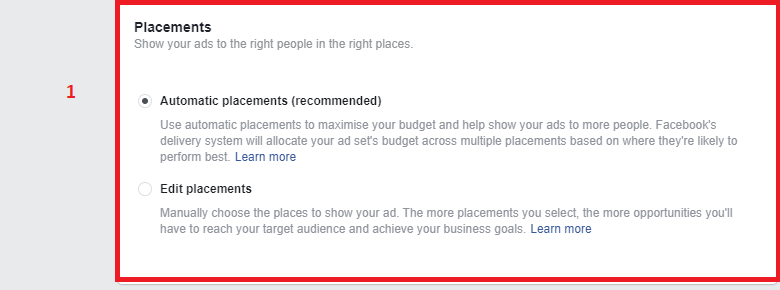
- Placements are generally recommended to be set on Automatic placements.
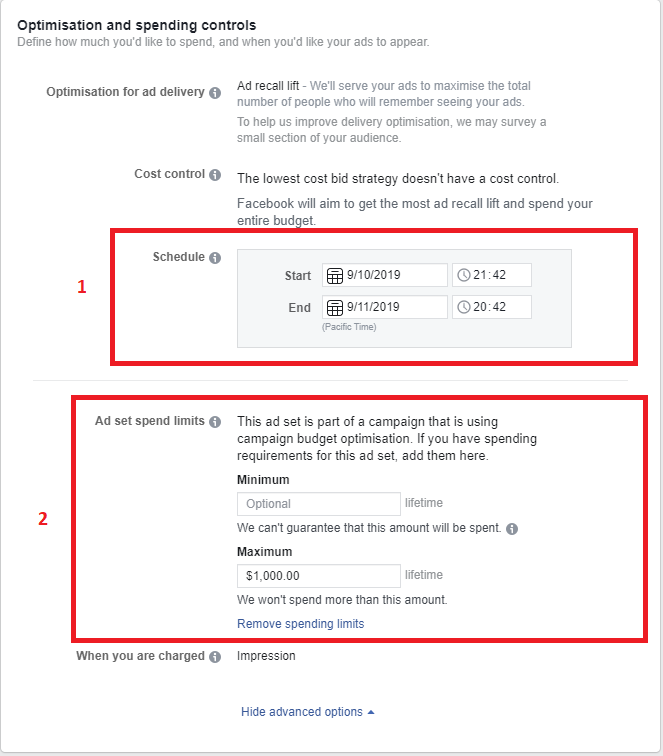
- It is recommended that campaigns run at a minimum of 30 days. Ensure that the dates are set correctly as per your sites needs.
- To ensure that your ad spend does not hit a maximum limit, place the maximum budget in the maximum column.
Step 4: Ad Creation, Ad name best practice and Campaign Artwork
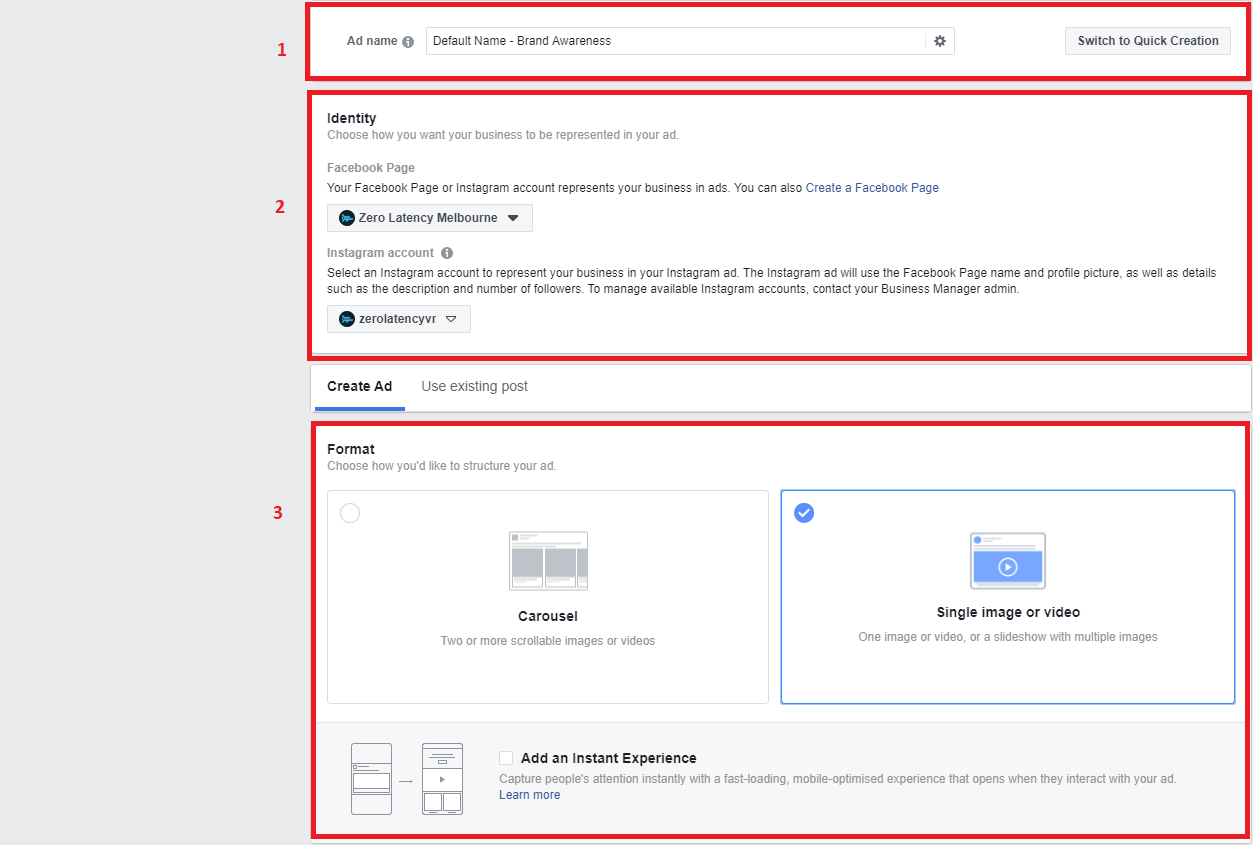
For this section of the guide, we will assume that the ad set up was for the Broad Reach - Look alike - Male 25-45 - Zombies - English.
- Your ad name should reflect the campaign artwork and campaign need. This ad name is for internal documentation, so best practice would be to name the ad something easy, readable and distinguishable. So the best practice way to name the ad will be
“Single Video - Zombies attacking Melbourne - POV Game Play”
- Identity should be set as your Zero Latency Site account, and have your linked Instagram account.
- Format is where you decide what sort of artwork you would like to display your ad in. Because we are going for this Broad Reach - Look alike - Male 25-45 - Zombies - English audience, the hypothesis is that visually, a video might capture more attention, with the campaign ad being decided to target a predominantly male audience in mind.
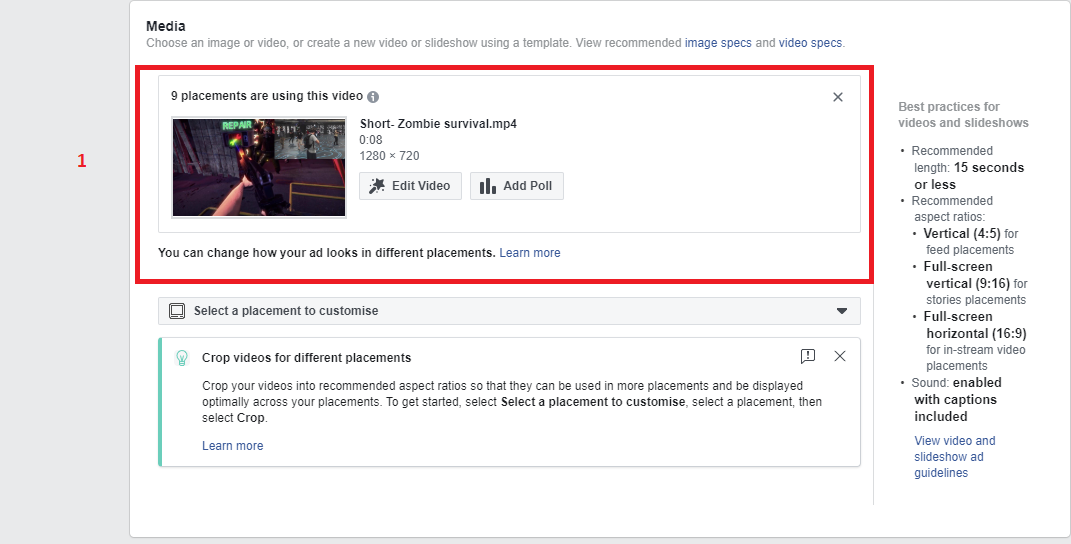
- Upload the desired video. Please make note of the cropping and dimensions needed to have optimal usage of space on Facebook. For more information please refer to THIS LINK
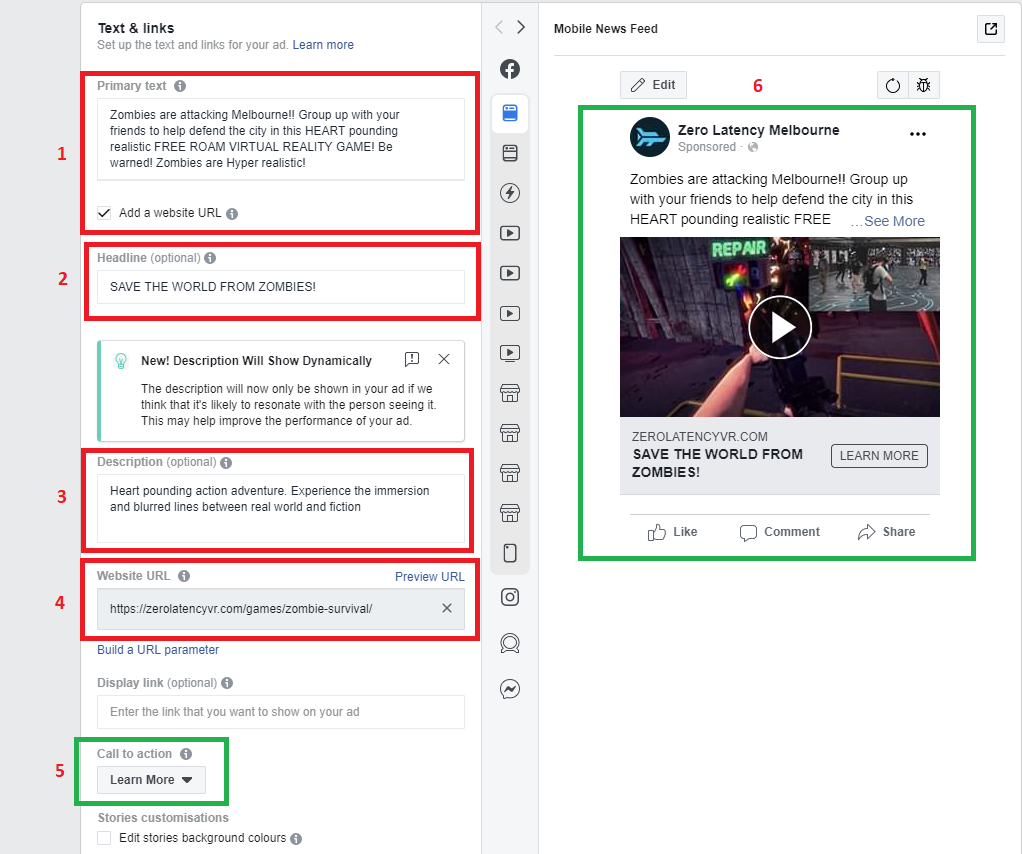
After you have set the premise of how your ad will be, this section would be where the marketing campaign application and thinking will translate into an ad. Seeing that this ad is specifically aimed to target Broad Reach - Look alike - Male 25-45 - Zombies - English. With the target locally in Melbourne, the prime use of this ad will be to increase awareness, and present Zero Latency to someone who has never interacted or seen Zero Latency, but has a vested interested and love zombies.
- Primary text should be to capture immediate attention, to set up the location of the service, to ensure people understand that it is an experience or a game, and is virtual reality. So copy writing should be targeted, to the point, but educational. This is so people are intrigued to the point of clicking through.
- A strong headline to play into the demographic and what your marketing think will attract this particular audience.
- A description to ensure additional reading material if someone choose to look at your ad.
- The website click through link here is crucial. As this is an education piece, you would want to lead your target audience to the game linked and displayed. With the intention for your audience to eventually scroll and look around the website. By linking through to the game directly, you are ensuring that the audience has the immediate interaction and continuity with the ad when now clicking through to your website.
- As this campaign is set as a brand awareness and education piece, [Learn More] should be chosen to resonate with the type of audience.
- This is an interactive screen where your marketeer will be able to preview the ad.
Step 5: Languages and Tracking
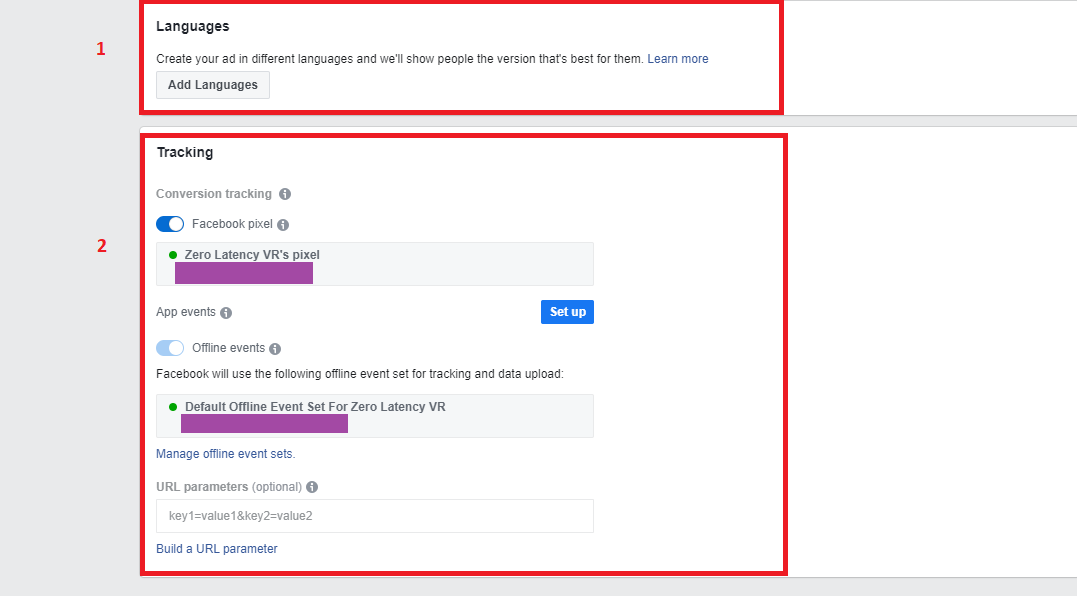
- Languages are set to the default, however, if you want to create the same ad in a different language, you may add it through the language tab
- Tracking should always be on for all Ads campaigns posted. It is recommended that all sites to have pixel tracking to ensure you are able to measure the success of your ad. To find out how to set up your Facebook pixel tracking with Zero Latency VR.
Conclusion
You will now understand how to create a general broad awareness campaign for your site. If you are having any issues with Facebook, please contact Facebook support. This guide is to serve only as a guideline, and will not guarantee a site’s success. This is to help site owners to identify and best serve their market in the brand awareness terms.
Article Keywords/Phrases:

How do I create a broad reach campaign?
Facebook broad reach
Comments
0 comments
Article is closed for comments.