Re-targeting Campaign Follow
Introduction
Marketing on Facebook & Instagram is one of the most effective means of driving traffic to your Zero Latency VR venue’s bookings page.
While each venue is unique with regional differences in the marketing landscape, this guide will serve as a general waypoint on how to create campaigns specifically to target prospective customers in segments.
In order to get the most benefit from this guide, please read Broach Reach Campaigns & Medium Reach Campaigns.
Identifying Marketing Objective for your Re-target campaign
Ad Set Name, Offer, Audience and Placements
Optimising and spending control
Creating, naming and Ad artwork placement
Facebook Tracking and Languages
Overview
Retargeting campaigns are aimed at the lowest point of your sales funnel. Ads from these campaigns are served to target audiences that are already familiar with virtual reality entertainment and aware of the Zero Latency VR brand.
You can generally define someone in this segment as any or all of the following:
- Familiar with Zero Latency VR
- An existing customer at your venue
- Has recently purchased a ticket at your venue (between 2-6 weeks)
- Highly engaged first-time purchaser (high engagement with ads and content)
- Not yet a customer at your venue, but has engaged with your ads consistently and is likely close to purchase
This audience although small in size is highly interested in the product and actively looking for a reason to make a purchase.
Campaigns positioned at the bottom of your sales funnel should take this into consideration, designed to provide the final nudge in converting. A campaign of this type could be a reminder, an event-based campaign or a promotion offering a discount.
Closely and frequently monitor the performance of these campaigns for ROI, optimising for driving conversion while reducing the cost to acquire.
Identifying Marketing Objective for your Re-target campaign
For the purpose of this guide, we will refer to Zero Latency Melbourne as the venue. This is an example only.
Zero Latency Melbourne wants to increase conversion on Facebook by encouraging existing customers and prospects (high engagement rates with content). The tactic is to offer a special discount code in a retargeting campaign.
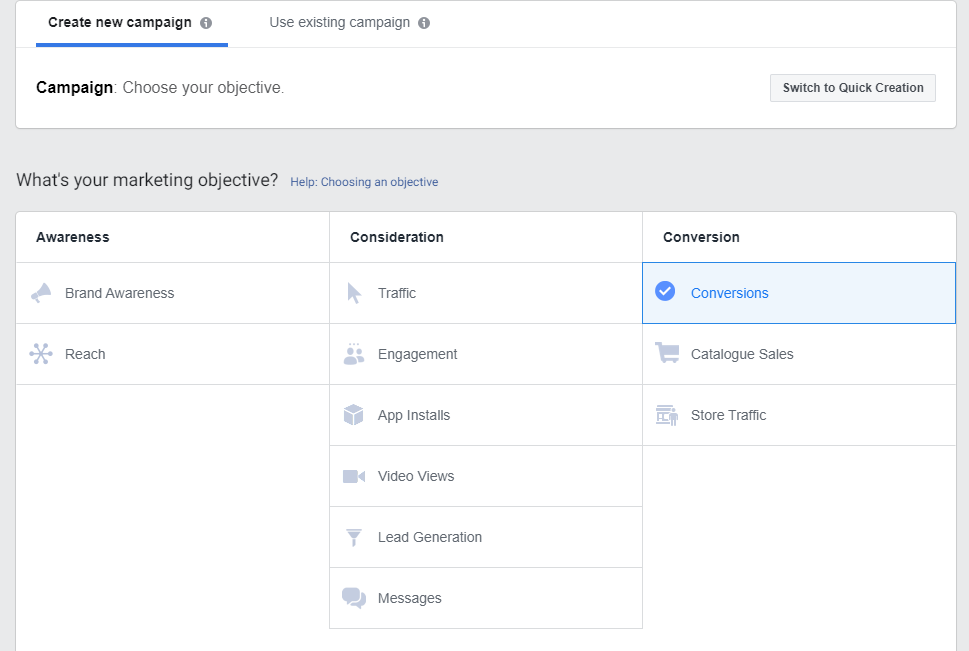
Conversion is chosen as the objective of the campaign
Once the desired campaign outcome has been chosen, we then go to the budgeting, ad spend and scheduling of the campaign.
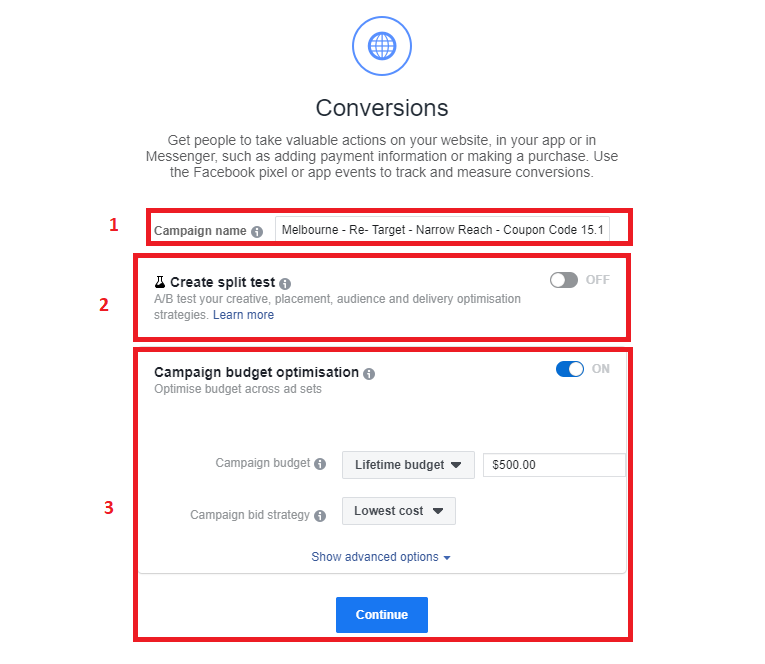
- Campaign name follows the best practice naming convention. Categorizing the campaign as “Re-target-Narrow Reach - Coupon Code - 15.10.2019 - 29.10.2019”. Dates are additionally placed on to quickly remind the marketer on the duration when the promo code will be on Facebook.
- A split test is not needed, as there is no variable that needs to be tested.
- Campaign budget optimisation is turned on, with the lifetime budget set at $500.00. Campaign bid strategy is set as the lowest. As we only want this campaign to run for 2 weeks.
Ad Set Name, Offer, Audience and Placements
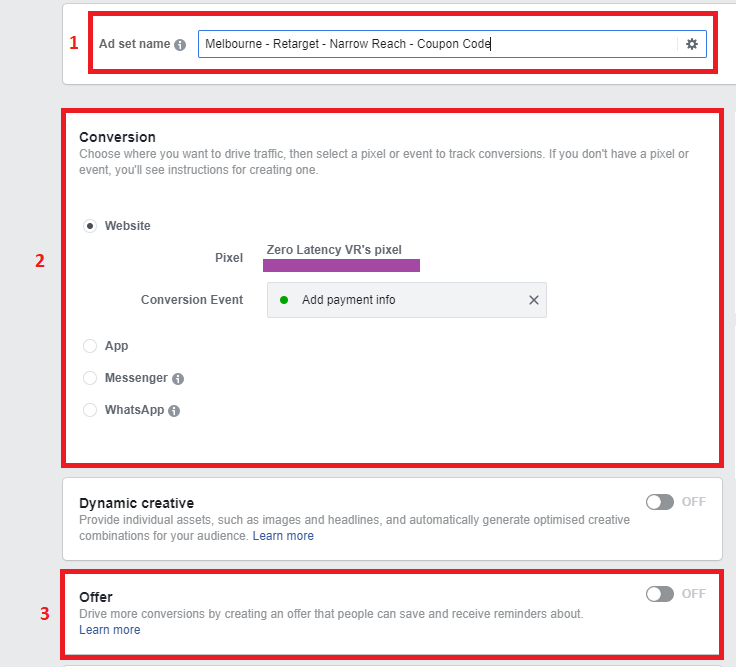
- The ad set is named with best practice for ease of tracking, keeping the messaging consistent and clearly stating the intention of the campaign.
- Conversion is set as website, implementing Facebook pixel in order to track the conversion rate.
- While there is an offer function in Facebook Business Manager to place coupon codes as an ad, Zero Latency VR’s Marketing Department has found that placing coupon codes within your ad’s text lines yields a better rate of conversion. Note that this is based on data for the Melbourne and Brisbane venues. It is our recommendation that if businesses choose to give out coupon codes, it should be laid out in a headline text. Of course as with any advice, what works for Australian sites may not be applicable in your region.
This campaign is designed with conversion in mind. The target audience is narrow (small in size), highly engaged and are looking for a reason to purchase.
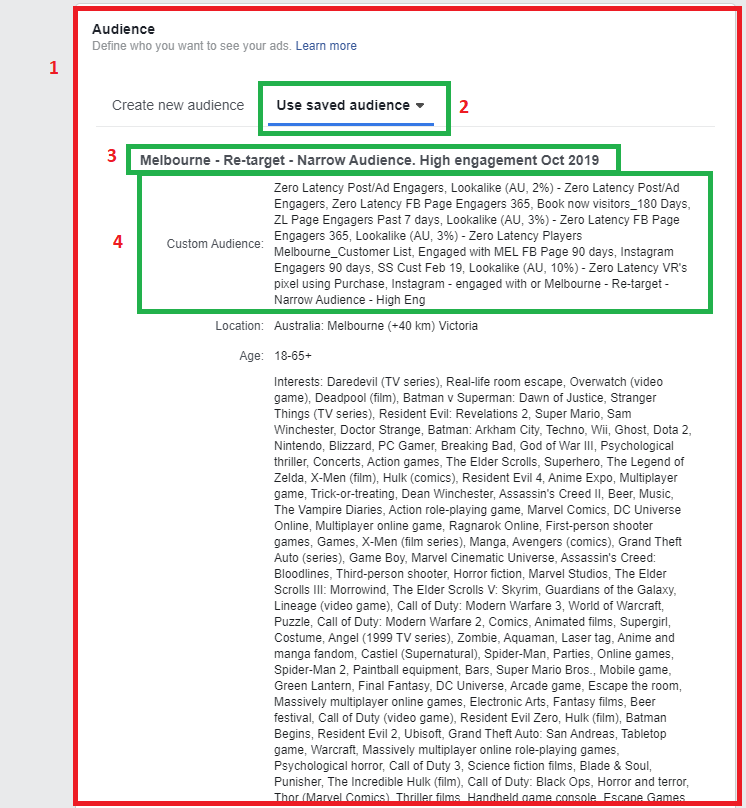
We begin with the Audience section of the campaign editor.
Please Note
Every venue's data and customer trends are unique. Don't use this as a measurement of success for your own venue.
- We now define the Audience we want to reach with this campaign.
- We use a saved target audience that has previously been set.
- Following the guide in the Broad Reach Campaign, we use a previously saved custom audience with best practice naming convention.
- Note that a narrow reach audience might hit special criteria such as “purchased in the last 180 days…” “highly engaged with Facebook page”. And other narrow reach criteria. In order to get this data, you must have Facebook Pixel setup.
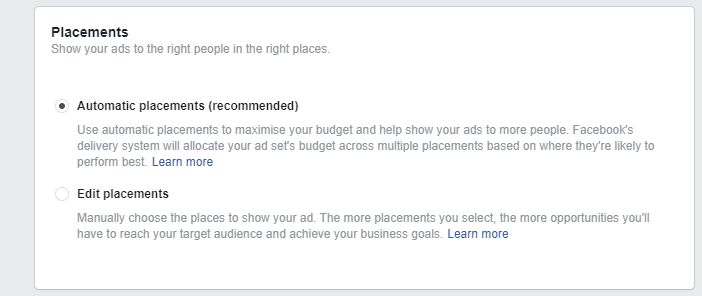
Placements are set as automatic as per Facebook’s recommendation.
Optimising and spending control
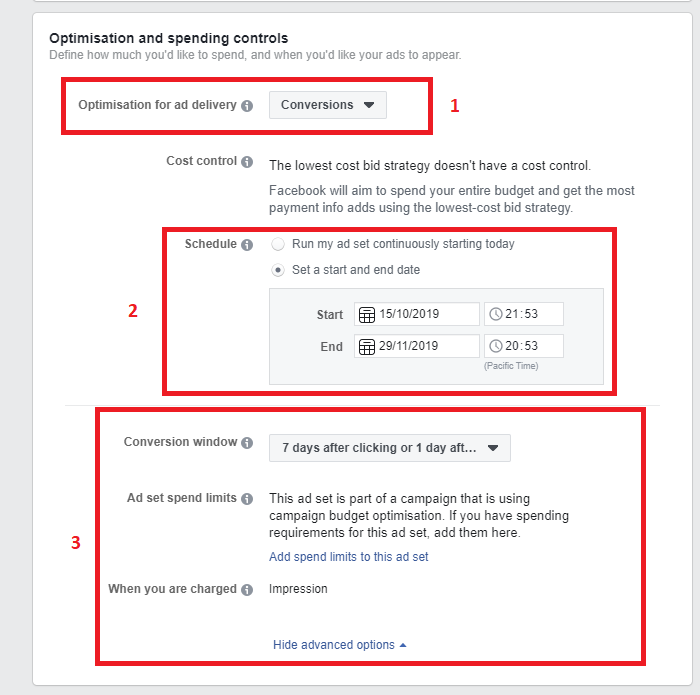
- Optimisation for the ad delivery is set to conversion as per the campaign objective
- The schedule is set to end in 2 weeks, as there is a coupon code being pushed out. This is consistent with how long we want the coupon codes to run for this campaign.
- Conversion metrics set as 7 days after clicking or 1 day after purchase.
Creating, naming and Ad artwork placement
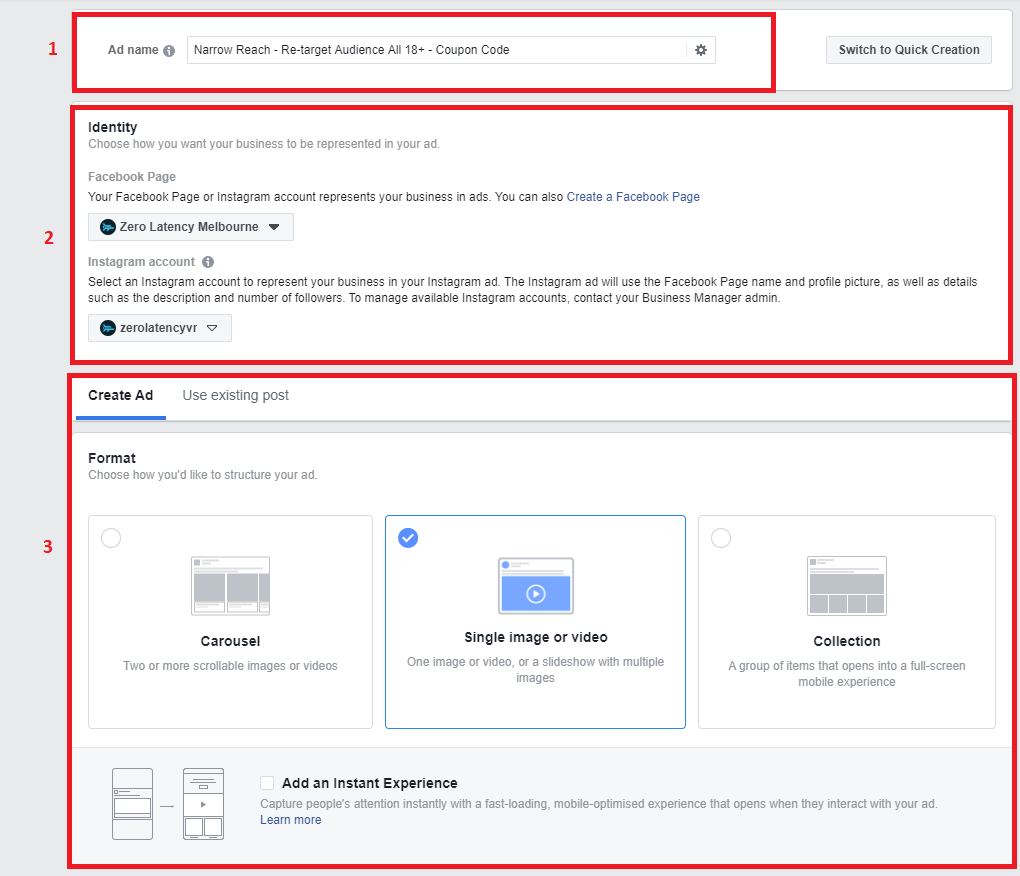
- Ad name is as per best practices naming guide.
- Identity is set as the site Facebook and Instagram account
- The format is chosen as a video for this campaign
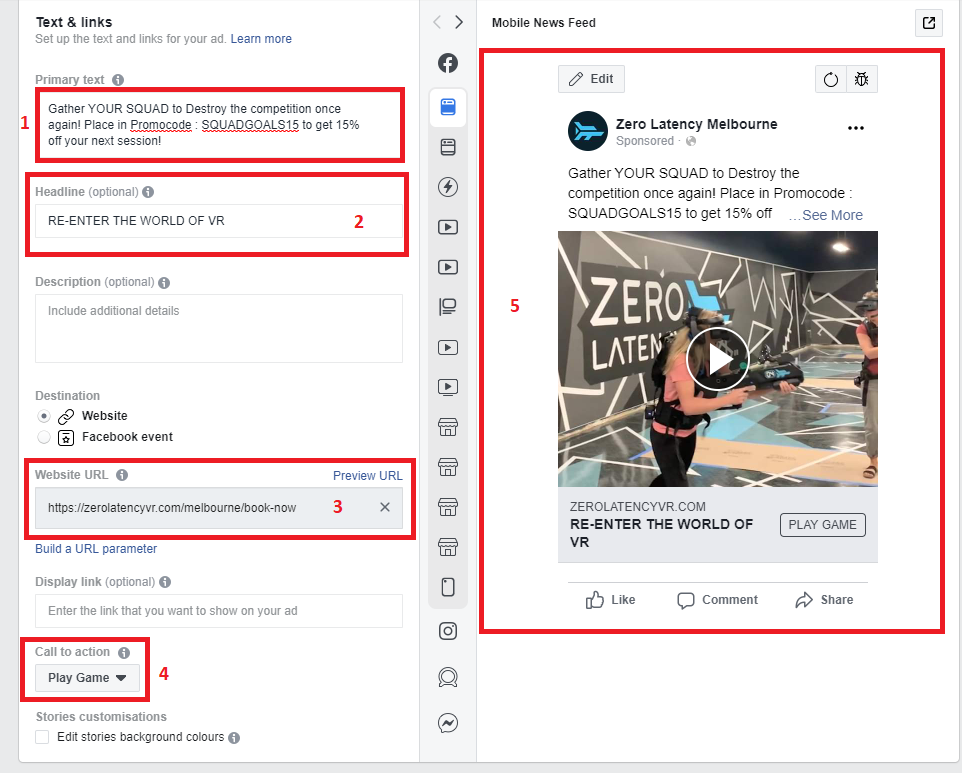
- Primary text with the offer placed to have people engage with the ad
- Headline as a call to action to reenter the world of VR
- Website URL links to the bookings page
- Call to action is for players to play the game again
- Video is posted with a preview before posting
Facebook Tracking and Languages
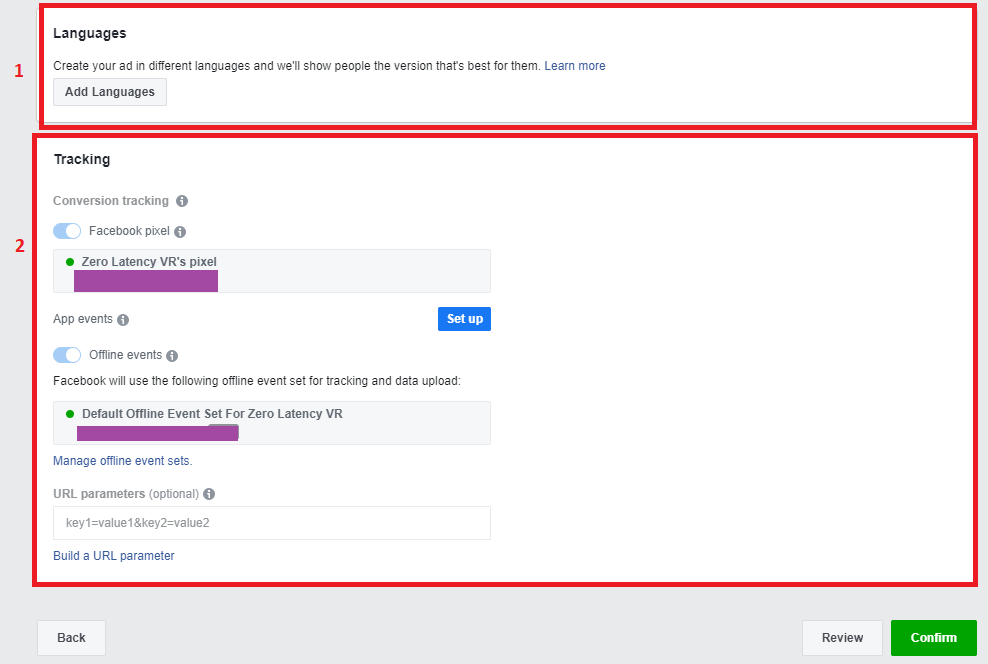
- Languages settings to remain neutral
- Tracking to be set with Facebook pixel. Without the need for offline events
Conclusion
Understanding the metrics, who you are targeting and the specific campaign goals are important in designing successful Facebook campaigns. Expect to amend your campaigns based on performance.
Article Keywords/Phrases:

How do I make a retargeting campaign?
Retargeting campaigns
Comments
0 comments
Article is closed for comments.