How do I create a Zero Latency Store account? Follow
Introduction
The Zero Latency Store is an online shop that is only accessible to those who have been given access. This is the new way to order equipment which allows you to pay for and track your purchases 24/7. This guide will explain the process of requesting access and logging into the store.
Step 1: Understand the Platform
Things to Consider
- Like other online stores, orders must be paid for at the time of placing the order. In the Zero Latency Store, this is done through Stripe.
- If you need an item that is not listed on the store, please let us know by contacting our Support Team.
- Some equipment requires assembly and may have a longer delivery time than others. In this case, the order will be split and you will be sent what is ready first.
- If the contact person for your deliveries has changed, please contact the Support Team so we can update our DHL records.
- You can give multiple staff members access to the Zero Latency Store.
- Except in special circumstances, orders will no longer be taken via tickets to the Support Team/Internal Sales Team. They must be placed through the store.
Step 1: Understand the Platform
It's important to understand how this platform works and how orders are processed. Please ensure the new user has read through the following guides prior to requesting access to avoid confusion and delayed deliveries down the track.
Step 2: Contact Support
To request access to the Zero Latency Store, send an email to support@zerolatencyvr.com with the following details of the user:
- Full name
- Email address
- If the user will be placing orders for multiple sites, please state which ones
If a staff member leaves and their access needs to be revoked, please let our Support Team know as soon as possible.
Step 3: Password Setup
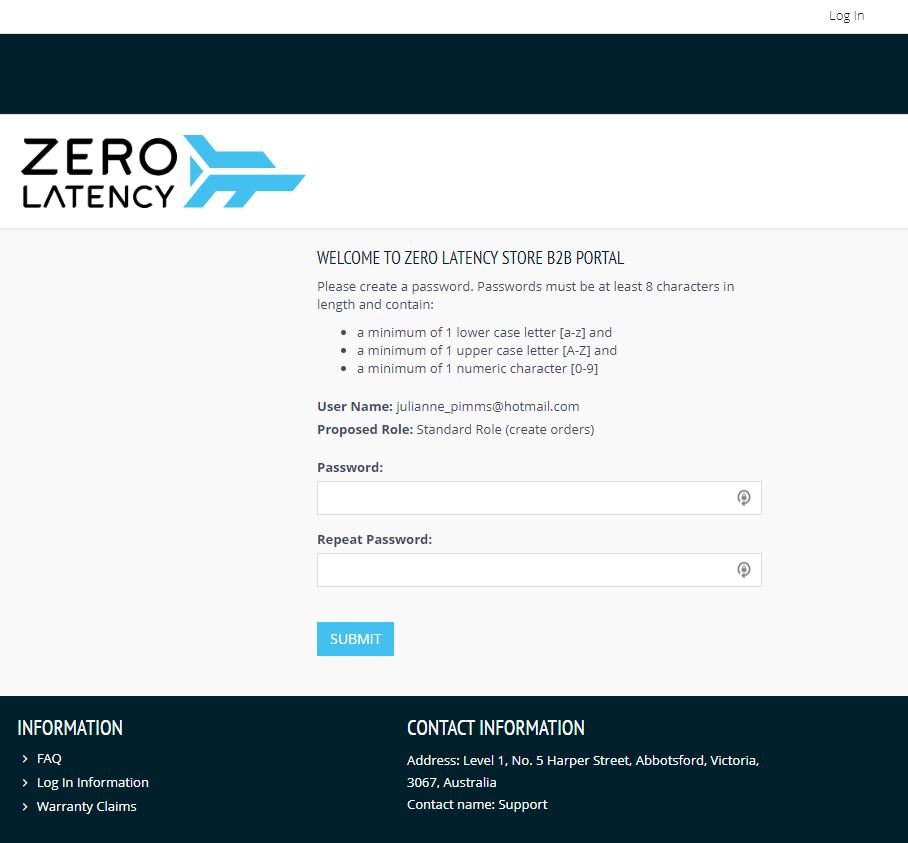
- An email invitation will be sent to the email provided. It contains a link at the bottom of the page which will open a new window prompting you to create a password. Once you do this, you will be able to login to the store.
Step 4: Accessing the Store
If you lose the website address, you can click the link below to go to the store at any time.
https://store.zerolatencyvr.com/
Another option is to click the link in the footer of Zendesk Guide.

Article Keywords/Phrases:

ZL store
Zero Latency Store
How do I make a ZL store account?
Comments
0 comments
Please sign in to leave a comment.