Game Safety System Follow
Introduction
Warning
This article covers the new safety system being introduced in FarCry VR 1.3.0 and Undead Arena 1.3.0.
This does not cover games released prior to May 2022: Outbreak Origins, Survival, Singularity, Engineerium and Sol Raiders (At this current time). These games use our legacy safety systems.
For information on the safety systems for these games please refer to their information pages.
The Safety System monitors, displays, and acts on various safety hazards for players - including walls, other players, system failures, and Game Master initiated pauses.
It does this through a combination of alerts (presenting warnings and alarms to players and GMs), while reducing distractions (removing gameplay elements, world visuals, sounds and player-to-player comms) so the player can pay attention.
What’s different in Safety System 2.0?
How the safety systems decides what to display
What’s different in Safety System 2.0?
The new safety system (Safety System 2.0) is much more obvious and intuitive for users, representing safety in the virtual world instead of abstract radars and text from our previous system. Instead of separate features which act independently (Radar and safety walls) we have simplified the system to consistent safety barriers around hazards (e.g. players and walls).
The new hazard system has a range of intensities to step in and address problems exactly as much as is needed. The more players are exposed to overly cautious warnings, the more likely they are to ignore important warnings when they appear. Sometimes less is more!
What has been removed in the consolidation
- The game no longer auto-pauses for all players when a player is too close to a wall. In Safety 2.0, only the offending player(s) will experience the safety warnings.
- Yellow walls in Far Cry VR have been removed.
- The yellow safety wall was originally introduced as we could not show players safety warnings of the other team in the game - and even if we could the radar was insufficient. And while the yellow wall kept players separated it introduced a new mechanic for players to learn.
- To consolidate and make safety simpler for players, we have removed the wall as the new safety system now shows the red safety barriers of the other team players instead. Providing the same warning but in the style that’s consistently applied across the game. Also covering any other scenarios where players incorrectly cross into the other team's playspace. The player barriers will also respond to show quicker and sooner if players are moving faster towards them.
- Running alerts have been removed as safety barriers will now appear much quicker and sooner the faster players are moving.
Since it is much more intuitive, players will manage themselves and keep their distance more reliably. This reduces the need for Game Masters to intervene!
How the safety systems decides what to display (Using distances and metrics)
Rather than relying on exact distances from walls and other players, the safety system works with a few combined metrics when deciding what to display. These metrics are helpful in talking about what players should be seeing, and how they should act.
When testing out the safety system, be aware that some displays are affected by more than just physical or virtual distance.
| System input | → | Safety metrics | → | Safety effects |
|
Player position Player facing Player speed Physical site size In-game world size Expected player movement Gamemaster voice/pause controls |
→ |
Information Deterrence Out of Bounds |
→ |
3d safety walls Audible alarms UI popups Audio filtering Out of bounds "safety void" |
Player Experience
Hazards
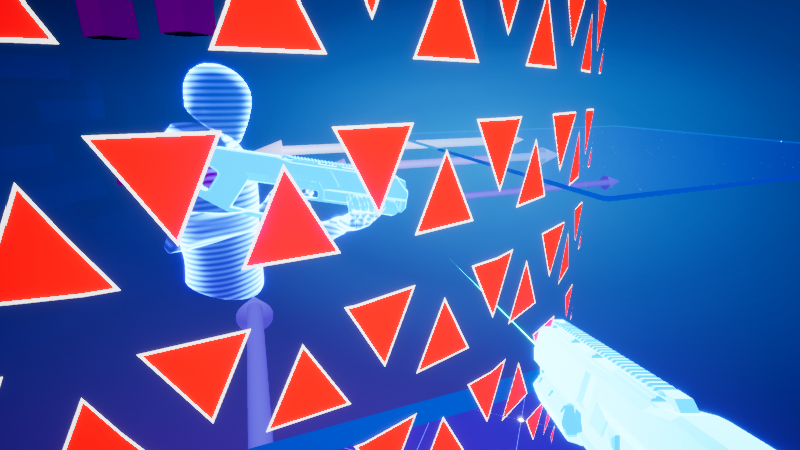
Safety hazards in the gamespace are marked by walls of red triangles. These hazards can be the edge of the gamespace, obstacles in the gamespace, other players, or in some cases areas of the game that are currently unsafe to be in.
The triangles expand based on how close a player is to hitting them (a combination of distance & speed).
If a player is too close the triangles flash, game audio and other player voice comms start fading out, and an alarm sounds until they return to safety.
If the player ignores the warning and steps through a boundary, their view of the game world beyond the boundary is removed, along with game audio.
| Gamespace boundary (Information) |
Gamespace boundary (Deterrence) |
Gamespace boundary (Out of Bounds) |
 |
 |
 |
Other players are surrounded by the same safety wall. Note that the wall size and position correspond to the physical gamespace, not the game world.
In content scaled environments (Spaces smaller than 20x10 or 15x15) this may make it seem large or out of place but it is more true to real life than the in-game player avatar, which will often appear further away than the other player actually is.
| Nearby player | Player in a different virtual space |
 |
 |
System Events
System events are issues that a player must react to, but cannot fix themselves.
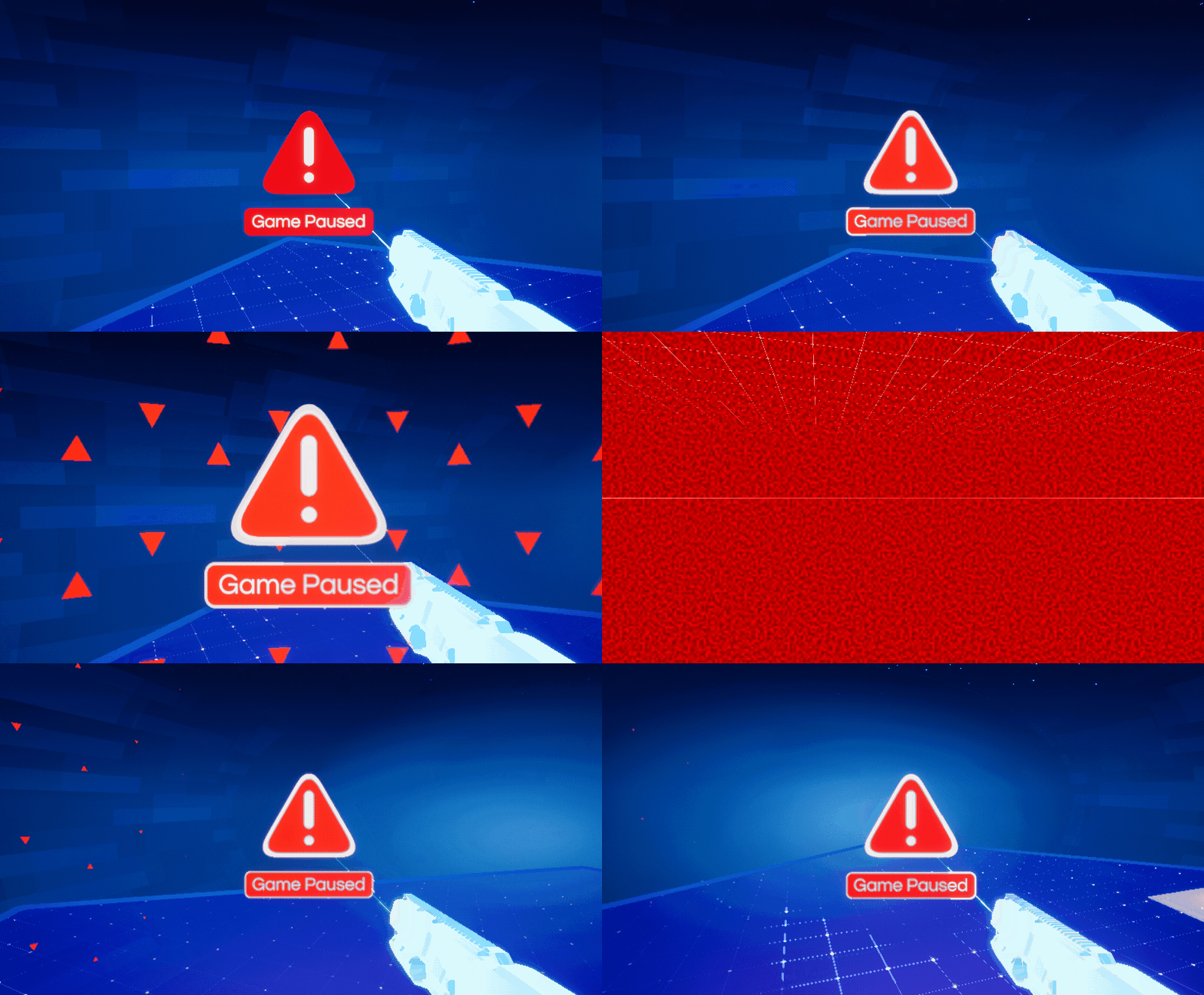
If positional tracking is lost or a network connection is disrupted, the game will automatically pause and any affected player will see an alert icon in the centre of their view.
As the game can't display accurate movement without tracking and networking, the game view is removed as well.
When the game is paused due to a system event or by the GM, unaffected players will still see the paused game but have a safety barrier placed around them to discourage moving around the gamespace.
This barrier works the same way as standard gamespace safety walls.
|
Player affected by a System alert |
Safety cage active while game is paused |
 |
 |
Voice Comms
Player-to-player voice comms are an important part of the Zero Latency experience, and Gamemaster-to-player voice comms are an important part of the safety system.
Other players' voices are mixed like any other part of the game experience - they will be suppressed if the listener steps out of bounds, or if alarms or the gamemaster's voice are taking priority.
Game Master Interface
In most cases, the split-screen view on the GM machine will show exactly what players are seeing, with some exceptions:
- Any system alerts are displayed directly over the split-screen viewport, rather than being placed in-world in front of the player's face.
- Some extra contextual information can be displayed. By default, this includes timing and status information on tracking & network loss events, and games can optionally add more if needed.
| Gamemaster view (normal play) | Gamemaster view (one player lost tracking) |
 |
 |
Article Keywords/Phrases:

Wall safety
Player safety
Hardware safety
Safety System
Comments
0 comments
Article is closed for comments.